CRM and sales
A CRM in Cognify is three or four panels and a handful of automations. Nothing here is a special mode. it is the ordinary building blocks, arranged for selling.
The panels
| Panel | Type | Holds |
|---|---|---|
| Leads | Standard | People who have shown interest but are not qualified yet |
| Contacts | Standard | Individual people you deal with |
| Companies | Standard | The organisations those people belong to |
| Deals | Standard | Opportunities with a value and a stage |
Small teams often merge Leads into Deals and skip Companies. Start with fewer panels and split later, moving rows between panels is a supported operation.
Columns worth having
On Deals
- Owner: the rep. Everything else keys off this.
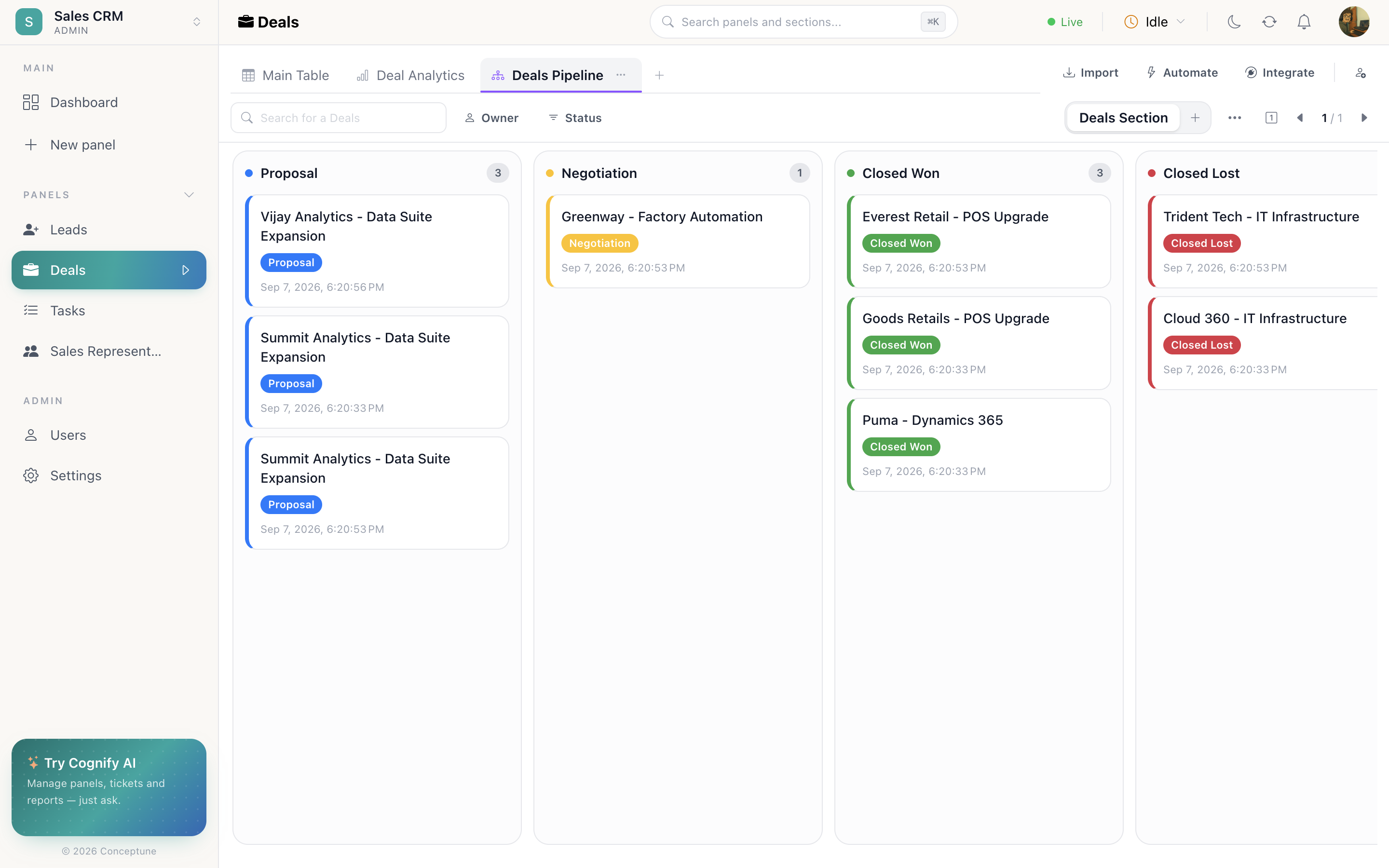
- Status: your pipeline stages. This is what the board's lanes come from.
- Decimal Number: deal value, with sum aggregation so the footer is your pipeline total.
- Date: expected close date.
- Connect → Companies, which organisation the deal belongs to.
- Connect → Contacts, who you are talking to.
- Date Time: won-at, stamped by an automation rather than by hand.
On Leads
- Email and Phone: also what duplicate detection matches on.
- Dropdown, the source: web form, referral, event, outbound.
- Mapping → Deals, so a qualified lead can be routed across automatically.
The pipeline board
Add a Pipeline tab to Deals and point it at your status column. One lane per stage, one card per deal, and dragging a card moves the deal, firing any automation watching that column.
The automations that do the work
a row is created → auto assign as owner
Inbound leads round-robin across the team, so nothing sits unclaimed.
a row is created → set status to something
Every new lead starts at New rather than blank.
status changes to something → set datetime to now
Stamp won-at when a deal reaches Won. This is what makes cycle-time reporting possible.
status changes to something → move row to mapped
A lead marked Qualified moves itself into the Deals panel.
number is greater than value → notify owner
Deals over a threshold get a second pair of eyes automatically.
Where leads come from
Public form
A “contact us” form on your site, landing straight in the Leads section.
Web chat
The bot captures name and email, and the conversation becomes a record.
An enquiry to a connected mailbox becomes a record on the panel.
Import
A list from an event or an old system, mapped onto your columns.
Reporting on it
Add a Graphs tab to Deals and build:
- A bar chart on status, how many deals sit at each stage.
- A text widget on deal value with sum: total pipeline as one number.
- A pie chart on lead source, where business actually comes from.
- A line chart on won-at, deals closed over time.
Pin the ones the team should see daily to the dashboard.
Sections for a sales panel
Use sections for splits that should be permanent, Open vs Won vs Lost, or one per quarter. Keep this month's target list as a Filter Table tab instead, since those rows should not move.