Sections
A section is a permanent split inside a panel: Open vs Archive, 2025 vs 2026, North vs South. Every row lives in exactly one, and the switcher remembers where you were.
Sections are not filters
This is the distinction worth getting right early:
Section
Where the row actually lives. Permanent, shared by everyone, and remembered between visits. Moving a row between sections is a deliberate act.
Filter
A temporary lens over whatever section you are in. Personal to this visit, cleared when you clear it.
If you find yourself applying the same filter every morning, that is a section waiting to happen. If you need a saved filter that everyone shares but rows should not move, use a Filter Table tab instead, see Tabs and views.
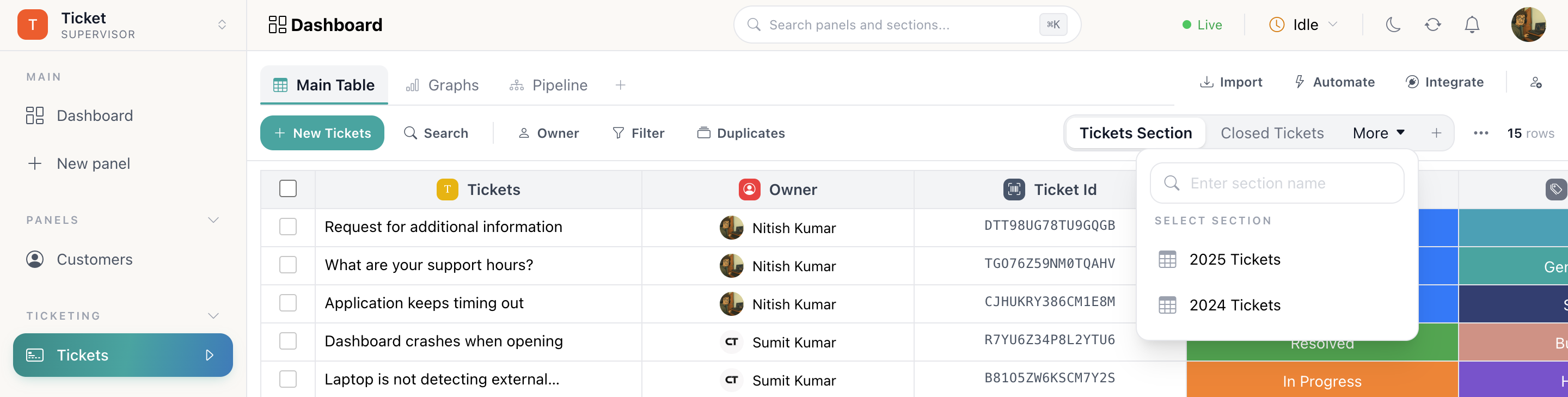
The switcher
Sections appear as pills in the table toolbar. Beyond two they collapse into More with a search box, so a panel split by month stays usable. The live row count for the current section sits on the right.
Section actions
The ⋯ menu on a section holds everything you can do to it:
| Action | What it does |
|---|---|
| Rename | Change the label on the pill |
| Export | Queue a server-side export of this section's rows: watch it in Background tasks |
| Form link | Publish this section as a public web form; answers arrive as rows here |
| Calibrate | Recount the section and rebuild its column aggregations |
| Delete | Remove the section. Its rows go with it |
Calibrate
Row counts and footer aggregations are maintained incrementally, which keeps a large panel fast. If a count or a total ever looks wrong, usually after a bulk import or a large move, Calibrate recounts the section from scratch and rebuilds every aggregation on it.
It is safe to run at any time and changes no data, only the derived numbers.
How do I…
Add a section: In the table toolbar, the + beside the section switcher.
Rename, export or delete a section: Section ⋯ menu → Rename, Export, Form link, Calibrate or Delete.
Move rows into another section: Select the rows with the checkbox column → Move to section → pick the target.
Fix a wrong row count or a stale total: Section ⋯ → Calibrate.